My LockBox - Lock Your Private Data

Do you have any data or files stored on your PC which is very private or so personal for you. But you have no idea about where to save those private data/files on your PC. And if that question hanging around your head for all this time,you should try My LockBox. Free software which is letting you to lock your private data with certain password you have made before,so there is only you who could open those data in the next time. Believe me, it's so simple to lock your private data! Come on try My LockBox?

::. Download

First,you have to download MyLock Box here. and then install it on your PC

::. How it Works

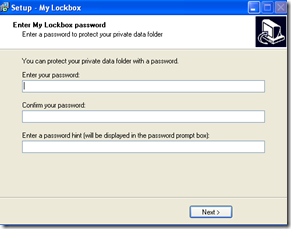
  1. Once you have installed My Lock Box on your PC,automatically it brings you to this:
  2. All you need to do is enter your password,confirm it,and enter  a password hint which will help you to memorize your password when you accidentally forget it.
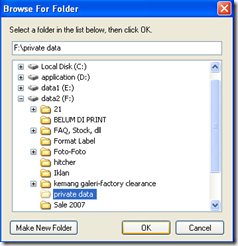
  3. And next,you should see the interface like this :
  4. Choose where your private folder is gonna be located by clicking browse button besides the textbox.
    *the private folder is a folder which contain all of your data you want to hide,so you have to store your private data on the folder first before going to install My lockbox programs
  5. If you have done so,click next and click next again.Finally click Finish.
  6. And now your private folder is locked,if sometimes you want unlock it,just simply open the Mylockbox program you have installed before,enter the password to log in and simply click the unlock button to allow you to access your data.
     
  7. Fullfil your privacy with Mylockbox ;give it a try !

Free download MylockBox here.

Readmore,..

How to add Different Meta tags in Different blogger posts

image Many blogger who use BLOGSPOT service for their blog platform (like me ;) ) feel disappointed when they can't put different Meta tags in different blogger posts, on the other hand,Wordpress user can do this(add different Meta tags in different posts) so easily with SEO tools or something like that which wordpress provides. But, no need to worry about that,or even thinking to change your blogspot become Wordpress or something else. Just follow my tips explained below,and you can add different Meta tags in Different blogger Posts.

::. What's the benefit or the use of adding different meta tags in different posts?

I told you that it is very useful especially for SEO(Search Engine Optimation) and SERP(Search Engine Result Page). By adding different meta tags in each posts, search engines can easily understand the content of your postings individually. Otherwise,when we only use the same meta tags to all posts in our blog,it is not optimal for our SEO process.

::. How to add Different Meta tags in Different blogger posts?

Don't think that this procedure is difficult to attempt or pratice,it is completely easy:

  1. First,you need to sign in to Blogger.com
  2. After you sign in;on the dashboard,click Layout -> Edit HTML
  3. Next,keep your eyes open and find this line:
    <b:include data='blog' name='all-head-content'/>
  4. And you can add this code,just below that line above:
    <b:if cond='data:blog.url == "http://www.ezpctips.blogspot.com/"'>

    <meta content='DESCRIPTION' name='description'/>
    <meta content='KEYWORDS' name='keywords'/> </b:if>
  5. So, the HTML code of your template should be looked like this:

    image
  6. Look, those three line that you have added before is used to add meta tags to your homepage.(change the http://www.ezpctips.blogspot.com become your blog URL.
  7. And now we attempt to add different meta tags(including meta description and keywords) on different posts. For example i want to add meta tags for my http://www.ezpctips.blogspot.com/2008/04/11/SG-TCP-Optimizer.html
  8. What you have to do is copy-pasting those three lines (which you have added before) below the present code and change the link,description,and also the keywords that suite to your posts content. So, the HTML code should look like this:
    <b:if cond='data:blog.url == "http://www.ezpctips.blogspot.com/"'>

    <meta content='DESCRIPTION' name='All computer tips'/>
    <meta content='KEYWORDS' name='computer tips,internet tips,free software'/> </b:if>


    <b:if cond='data:blog.url == "http://www.ezpctips.blogspot.com/2008/04/11/SG-TCP-Optimizer.html /"'>

    <meta content='DESCRIPTION' name='SG TCP Optimizer free download and review'/>
    <meta content='KEYWORDS' name='SG TCP Optimizer,SG TCP free download'/> </b:if>
  9. And if you want to add another meta tags to other postings,just do the same easy procedures explained above.

Good luck pal! Happy blogging!!

Readmore,..

SG TCP Optimizer

Are you satisfied with your internet speed? Maybe some of you are not satisfied with. Sometimes it works so fast and quick,but sometimes it works too slow perhaps. And now, let's solve your problem with SG TCP Optimizer. Maybe this words is kind of new for you. Well,actually SG TCP Optimizer is free and easy Windows program that helps you to tweak TCP and IP related parameters in Windows Registry to speed up your Internet speed.

The good point of SG TCP Optimizer is applicable in all types of internet connection, whether it’s cable modem connection, DSL connection, lease line or dial up connection. This software is relevant for you who want to increase or optimize internet connection speed. That is why i suggest you to try SG TCP Optimizer

::. Download

You can download free SG TCP Optimizer here. The new version of SG TCP Optimizer also support VIsta OS ;) .image

::. Screenshot
clip_image001[4]


::. How - To

Once you finished download SG TCP Optimizer,double click the program u have downloaded to run it (it no need to installed first,just download and run :) ) As you can see on the picture above,it is the screenshot of SG TCP Optimizer.

  1. Before we do some simple tweaking to our registry,we should test our internet connection speed first.It help us to compare between the before-tweaking-internet-speed and after-tweaking-internet-speed. O yea,almost forgot:you can test your internet connection speed here . And this is my internet speed before i tweak my registry:
    image
  2. Well,let's start our adventure to optimize our internet connection speed. As I told you before,run the program(SG TCP Optimizer) u have downloaded before by double click on the program icon.
  3. And then choose your maximum internet connection speed on the slidebar. Note: the scale on the slidebar is Kbps (if your connection scale is Mbps,just times it by 1000 to convert it become Kbps;for example,if your connection speed is about 2 Mbps,so it means your speed is 2000 Kbps). My maximum speed is about 1 Mbps so i choose 1024 Kbps
    image
     
  4. Next step is to tick Modify All Network Adapters,and don't forget to select Optimal settings before click on Apply Changes.
    image
  5. Once,you have to tick backup option to backup your registry settings and click OK,and to see the result,restart or reboot your computer.
    clip_image001[6]
  6. After restarting your computer,let's do the same internet speed test we have done before to compare our internet speed between before tweaking,and after tweaking.
  7. And,voila. This is my after tweaking result:
    image
  8. As you can see. My internet connection speed have significant improvement from 492 Kbps -> 524 Kbps (download stream). But a little improvement on upload speed : 78 kbps -> 91 kbps

I hope u feel satisfied with your internet connection speed after you try this tips (SG TCP Optimizer free download) . Feel free to ask me about any trouble or difficulties u got when attempt my tips above. Happy tweaking!

Readmore,..

How to Hide Desktop Icon for XP

Hey, it's been a long time since ezpctips give you the most useful computer tips. Actually i had to prepare myself to face My final National Exam so i can't do daily posting as usual.But now here I come back, with reliable and useful or even powerful computer tips. and now i will tell you some simple tips that you had to try to customize your desktop. This called hide Desktop Icon

Okay, today i will tell you how to hide your desktop icon; this tips is simple to do, you can easily perform it on your pc or laptop. Maybe some of you wonder why should we hide our desktop icon? Well, sometimes when we had a cool wallpaper hang on our desktop,it's become lack of art when many icons collide with the picture, and that's why we should hide our desktop icon.

clip_image002  clip_image002[5]
              Before                                         After

Hide Desktop Icon is very easy to do, you just need to do a few clicks procedure?

  1. On the blank side of your desktop, right click and select 'Arrange Icons by' submenu
  2. Then click 'Show Desktop Icons' to uncheck the option.

In a few seconds, the desktop should be cleaned as beauty as an artful canvas, and your artful wallpaper won't collide with those iritatting icons. To show the icons, repeat the procedure above.

Hide desktop icon in XP

Readmore,..

How to Improve SERP

This time ezpctips will share some usefull tips about How to Improve SERP. All of you have known that SERP or Search Engine Result Page is the key factor for your visitor coming to your blog or website. How to Improve SERP has become an old question for blogger newbie,or newbie webmasters. And now,i will reveal the answer for the question: How to Improve SERP.

::. Introduction

Before i told you the trick to improve SERP,let me explain you what is SERP. SERP stands for Search Engine Results Position. SERP is the listing of web pages returned by a search engine in response to a keyword query. Each page typically consists of 10 URLs, with no more than 2 URLs per domain. If your blog or website sit on the first page of SERP for particular keywords,your blog will get a great great traffic.Otherwise,if your blog is not good on SERP,your blog is difficult to get visitors from search engines.

::. The Answer of How to Improve SERP

I have to tell you that to Improve SERP is not easy as abc. Could be say that sometimes How to Improve SERP is an on-going process,but sometimes hitting the first page or even the first list on SERP could be so easy. So here are the steps to Improve SERP: Improve SERP

  • The first first thing you have to do is to find your keyword you want to rank high on search engine(let it say Google). In this example i use keyword 'emoticon.
    After you found the keyword,do some search on Google about your keyword.And this is what google says: 
    clip_image002


You could see on that image that keyword 'emoticon' returns more than 11 millions results.It obviously a difficult niche and you have to find another keyword. i use 'how to make animated emoticon' 
Hey... you could see that it only returns about 200thousands results.And it's suite for your keyword instead of 'emoticon'

  • The second steps to help you improve your SERP is to spread your keyword on your posting or webpage as many as possible.You have to noticed that you also have to make special attribute on those keywords(i.e:by bolding them,underlined,highlight,etc)
  • After you have done with those steps, the hardest thing or process to Improve SERP is to collect many quality backlinks from other website which have topics in common(example:if your blog or website is talking about music,you should find quality backlinks from music forum,or music website/blog.).
    Actually,this steps is called an on-going process. How to Improve SERP is not an one night-job-done.It need months to be well done.

Yup,that is How to Improve SERP .if you practice it well,i'm sure your blog or website will have a great numbers of visitors. That's it about How to Improve SERP. If you have question just feel free to ask me about it. Thanks...


Technorati Tags:
Readmore,..