Showing posts with label Free Software. Show all posts

My LockBox - Lock Your Private Data

Do you have any data or files stored on your PC which is very private or so personal for you. But you have no idea about where to save those private data/files on your PC. And if that question hanging around your head for all this time,you should try My LockBox. Free software which is letting you to lock your private data with certain password you have made before,so there is only you who could open those data in the next time. Believe me, it's so simple to lock your private data! Come on try My LockBox?

::. Download

First,you have to download MyLock Box here. and then install it on your PC

::. How it Works

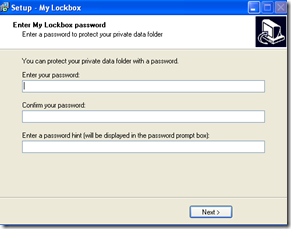
  1. Once you have installed My Lock Box on your PC,automatically it brings you to this:
  2. All you need to do is enter your password,confirm it,and enter  a password hint which will help you to memorize your password when you accidentally forget it.
  3. And next,you should see the interface like this :
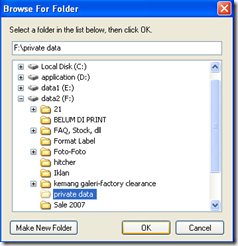
  4. Choose where your private folder is gonna be located by clicking browse button besides the textbox.
    *the private folder is a folder which contain all of your data you want to hide,so you have to store your private data on the folder first before going to install My lockbox programs
  5. If you have done so,click next and click next again.Finally click Finish.
  6. And now your private folder is locked,if sometimes you want unlock it,just simply open the Mylockbox program you have installed before,enter the password to log in and simply click the unlock button to allow you to access your data.
     
  7. Fullfil your privacy with Mylockbox ;give it a try !

Free download MylockBox here.

Readmore,..

Recuva 1.24 | Easily restore your missing files

image Hey guys,this time ezpctips come up with review plus free download of Recuva 1.24. Recuva 1.24 is the best solution for searching your missing file on your computer,Recuva 1.24 can be easily used to search and restore your missing file on computer or any portable media.


::. Screenshot

Recuva 1.24 is a freeware by piriform Ltd, A software that is able to recover missing or deleted files or data. The good score of this software is its friendly user-interface.Though,Recuva 1.24 also available on Advanced mode,which provide:preview box,header,and 'info' contains all information of the missing or deleted files.So,in the info box, we can see where is the file was located ago,the condition of the file;there are 3 condition:Excellent,Poor,and Unrecoverable.

The setting mode(option mode) on Recuva is pretty easy. On the option mode, we can choose the language appeared,set what type of the program look liked(List View,Tree View,or Thumbnails view),and for intermediate, Recuva provides Advanced Setting mode, on it they can configure the secure overwriting mode(Simple,DOD,NSA,or Gutmann).

::. Download

You can easily and freely download the installer of Recuva 1.24 on this link: Recuva 1.24


After downloading Recuva, it will be very appreciated,if you leave your comment of this program(Recuva.1.24) below on comment box,thank you: All computer tips

Readmore,..

Windows 7 Beta 1 available for download

The constant wave of Windows 7 Beta chatter from Redmond, even without an official confirmation from Microsoft, is a clear indication that the company is gearing up to move the next iteration of the Windows client beyond the development milestone (M) stages.

With the Windows 7 roadshow approaching at a fast pace, as Microsoft is getting closer and closer to events such as the Professional Developer Conference 2008 (October), Windows Hardware Engineering Conference 2008 (November) and TechEd 2008 EMEA (November), the first Beta build of the operating system is starting to take contour. Still, Windows 7 Beta 1 will not make it to the October and November conferences, as it is planned for availability in mid-December 2008.

Microsoft has failed to either confirm or deny this piece of information at this point in time, but according to Mary Jo Foley, citing unnamed sources, Windows 7 beta 1 will drop just ahead of Christmas 2008. On Vista WinHEC 2008 homepage, Microsoft is claiming that Windows 7 “is coming soon” but doesn't give any indication of the actual deadline, although it is rushing hardware manufacturers to get ready for the operating system.

The Redmond giant released the first taste of Windows 7 back in December 2007. At that time, Milestone 1 was virtually indistinguishable from Windows Vista. Moving forward into the development process, the Redmond company has also produced a Milestone 2 Build of Windows 7, which was kept tight under wraps and wasn't leaked like M1. The next move as far as the evolution of Windows 7 is concerned is a Milestone 3 release, which in its turn will be followed by the first Beta build of the platform. One thing is for sure, under the leadership of Steven Sinofsky, Senior Vice President, Windows and Windows Live Engineering Group, Windows 7 will have a short Beta life, approximately a year. Microsoft is reportedly not preparing a wide release of Windows 7 Beta until the client is either feature-complete or very close to the final version.

Download: Windows 7 public beta Official download links

Mirrors: Windows 7 Beta 1 Build 7000 HERE

ezpctips.blogspot.com


Source:news.softpedia.com
Readmore,..

Windows 7 themes for Windows XP

Sure, we don't actually have any real idea what Windows 7 will look like. But if you believe the screenshots floating around the web, the next version of Windows will look an awful lot like Vista.

clip_image001by Brad Linder

clip_image002

Sure, we don't actually have any real idea what Windows 7 will look like. But if you believe the screenshots floating around the web, the next version of Windows will look an awful lot like Vista. With a few new effects. And so when the folks at DeviantART decided to put together a few Windows 7 themes for Windows XP, it shouldn't come as a surprise that the themes look and feel a lot like Windows Vista.
That said, they're much prettier than the default themes available for Windows XP. Unfortunately, Microsoft doesn't make it easy to install third party themes for Windows XP. Officially you're pretty much stuck with Windows XP, Windows Classic, and a Microsoft Zune theme. So the first thing you need to do to install a third party theme is to install a program called UxTheme Patcher.
If you're running Windows XP SP2 or earlier, you can download a Windows 7 theme and UxTheme Patcher in one fell swoop at MegaLeecher. Just unzip the file and click the multi-patcher file in the UX Theme Patcher Folder and then click the Windows 7 M1 VS.msstyles file in the Windows 7 M1 VS subfolder in the Themes folder.
But the included UxTheme Patcher isn't compatible with Windows XP SP3. So if you have SP3 installed, you'll need to download and install a patcher from another location. Once you've done that and rebooted your system, you should be able to install third party themes like the Windows 7 theme. Just don't expect it to look like much other than a Windows Vista theme.
What are some of your favorite third party themes for Windows XP? Let us know in the comments.
[via Life Rocks 2.0 and Shell Extension City]


Readmore,..

Speed Up LimeWire with Limeware Turbo Accelerator

Maybe some of you who have download Limewire from this blog feel that the performance of Limeware is not too comfortable and speedy, especially when you try to download many mp3 with it. So, I give you the answer for your pain, that is Limewire Turbo Accelerator which you can download on this blog.

LimeWire Turbo Accelerator is a tool for LimeWire file sharing application, created to solve problems like: slow downloads and disconnections, traffic congestion, improving download speed and reliability, doing so by several methods to achieve 200% to 400% faster downloads, according to our tests, user and website reviews.

Various features of the program are detailed bellow. Interface is beautiful and user-friendly

Here are some key features of "LimeWire Turbo Accelerator":

· Interface is pleasant and very easy to use;
· Automatically clears downloaded and wrong files;
· Operable by system tray icon for quicker and easier use;
· Automatically resumes paused downloads;
· Automatically searches for more sources at user-specified intervals;
· Saves configurations from last run and auto loads on start-up.

Requirements:
· LimeWire installed

Limitations:

· nag screen
· some features are disabled

What's New in This Release: [ read full changelog ]

· Performance enhancements and some bug fixes. Now including the Security Toolbar for free.

Reasons why this program is marked as adware:

· Offers to download or install software or components (Free Security Toolbar) that the program does not require to fully function

Download Limewire Turbo Accelerator here

Download Limewire Turbo 5.5.6


Readmore,..

Easy Download MP3,VideoTips

Today tips shared in ezpctips is about easy download mp3,video files,or any executable programs on internet.
Maybe some of you are confused when you didn't find any related music files you were going to download when you do some search on many Search Engine.

Moreover, it's not that easy to find free mp3 download over internet. Therefore you should try Lime Wire Turbo 5.5.6 to solve your problems. You can download it for free on this blog.

As I told you in the previous post. Lime Wire is the fastest p2p file sharing over internet. It helps you to find any mp3, video,image,program,and also documents related with your keyword you type on the Search box. This is the main advantage of using Limewire Turbo than using the search engine to find any related music files.


Limewire has a simple interface so all beginners hopefully able to run this program and feel the vibe.
First,when you have already installed the program on your system, it automatically asked you to choose what internet connection you have, it helps you to give the most effective way of downloading. And then you'll see a simple interface given. Look at the left side/pane, select the search type determines what kind of file you are about to download. After you select one of them, type the keyword, or title of files you want to download, and don't forget to click Search button.
Next, in the right pane you'll see a queue of many files there, if you have found the file you want to download you can click Stop Search button. And pick one or more file you want to download, select them and click Download Button at the bottom. Easy right?

Download Lime Wire Turbo 5.5.6 here


Readmore,..

Lime Wire Turbo 5.5.1 Free Download and Review

If in the early post I have give you LimeWire 4.18 for free,Now it's the time to try the latest Limewire Turbo 5.5.6 for free!!

Download LimeWire 5.5.6 here

LimeWire Turbo 5.4.6 is file sharing/peer to peer software developed by ProSharing.

LimeWire Turbo is one of the most popular p2p file sharing application around the world which allows users to search for and to share media files like MP3, movies, pictures, games, software, documents with anyone over the Internet. LimeWire Turbo has unique features, including ghost ratings and completely user-configurable queue area, "swarming" downloads, meaning that parts of a file will be downloaded from different peers if available.

This file sharing/peer to peer software is freeware, which means you can download and use LimeWire Turbo 5.4.6 absolutely free. There's no need to buy the product. LimeWire Turbo 5.4.6 supports different languages (including English). It works with Windows 98/XP/Vista.
Readmore,..

SG TCP 2.0.3

click here to download ---> Download Now (596K)

Description: TCP Optimizer is a free program that provides 1-click acceleration of your internet connection through optimizing your internet registry settings.

The first question on many people’s minds whenever they hear of a program that purports to do something like this is invariably whether or not it is for real. The short answer to this question is yes; for the long answer, you can see the results below of my tests that I conducted with various TCP Optimizer settings.


There are 2 ways to use this program: if you are well versed with the different registry settings you can certainly perform your own custom tweaks across dozens of settings (go here for an explanation of all of these). For most of us, however, TCP Optimizer will automatically find out optimal settings based on one (or two) user inputs, as follows:

  • Connection speed slider: adjust this depending on what the maximum speed of your internet connection as advertised by your internet provider.
  • Network adapter selection: if you are using wireless make sure to set this to your wireless adapter; otherwise leave it alone.
  • That’s it. Click on the ’optimal settings’ radio button and then apply.

The program can aid both the novice and the advanced user in tweaking related TCP/IP parameters in the Windows Registry, making it easy to tune your system to the type of Internet connection used. The tool uses advanced algorithms, and the bandwidth*delay product to find the best TCP Window for your specific connection speed. It provides for easy tuning of all related TCP/IP parameters, such as MTU, RWIN, and even advanced ones like QoS and ToS/Diffserv prioritization. The program works with all current versions of Windows, and includes additional tools, such as testing average latency over multiple hosts, and finding the largest possible packet size (MTU).
The TCP Optimizer is targeted towards broadband internet connections, however it can be helpful with tuning any internet connection type, from dialup to Gigabit+ :)

If you need help with the program, check the TCP Optimizer documentation, read our broadband tweaking articles, the Optimizer FAQ, and/or visit our Forums. The program can be freely (re)distributed, as long as you give us proper credit as the author, and it is not sold for profit.

Comments about SG TCP 2.0.3(from download.com):

"Good program"

by combatshotgun on April 26, 2006

Pros: I'm a beginner here, so I didn't really know how to use this program at first. But the website has a user guide on it.

Or, if you can't be bothered to read it, it can automatically configure the settings for you (but you have to give them your maximum bandwidth speed - CNET has a bandwidth checker).

Webpages load noticably faster now.

Cons: Not beginner-friendly.

"it really does work.."

by johnny69er on August 22, 2006

Pros: it does speed your download speeds up by quite a bit...

Cons: none really...

"Very comfortable program."

by Dima_R on February 13, 2006

Pros: Very comfortable program.

Good interface

Cons: But from the help it is impossible to obtain additional information

Download SG TCP 2.0.3: Download Now (596K)

Source:speedguide.net ; download.com


Readmore,..

Lime Wire 4.18

Download Now (4.67MB)

Tested spyware freeclip_image001

LimeWire 4.18.6 is the world´s fastest P2P file-sharing application, letting users share and search for all types of computer files, including movies, pictures, games, and text documents. The application´s other features include dynamic querying, the ability to preview files while downloading, advanced techniques for locating rare files, and an extremely intuitive user interface.

LimeWire is compatible with the Gnutella file-sharing protocol and can connect with anyone else running Gnutella-compatible software.


At startup, the LimeWire program will connect, via the internet, to the LimeWire Gateway, a specialized intelligent Gnutella router, at startup to maximize the user's viewable network space.LimeWire is a tool that allows you to share files over the internet.

Further, the most recent version of Lime Wire enables Group functionality, so that users can connect to other people interested in sharing the same kinds of files that they are.

Features:

  • Ease of use - just install, run, and search
  • Ability to search by artist, title, genre, or other metainformation
  • Elegant multiple search tabbed interface
  • "Swarm" downloads from multiple hosts help you get files faster
  • iTunes integration for Mac users
  • Unique "ultrapeer" technology reduces bandwidth requirements for most users
  • Integrated chat
  • Browse host feature--even works through firewalls
  • Added Bitzi metadata lookup
  • International versions: Now available in many new languages.
  • Connects to the network using GWebCache, a distributed connection system
  • Automatic local network searches for lightning-fast downloads. If you're on a corporate or university network, download files from other users on the same network almost instantaneously!
  • Support for MAGNET links that allow you to click on web page links that access Gnutella.

Size: 4.67 MB
Publisher: Visit Website
Release Date: 2008-08-22
OS: Win 9x/ME/2K/NT/XP/Vista

Download Now (4.67MB)


Readmore,..

Enjoy the speedy browser of Google Chrome

From pcworld.com and pctipsbox.com

Click here to download Google Chrome

Google takes aim squarely at Microsoft with the release of its new Web browser, Chrome. Even though it isn't jam-packed with features, Chrome lives up to its hype by rethinking the Web browser in clever and convenient ways that make using the Web a more organic experience than you'd get with either Microsoft's Internet Explorer 8 or Mozilla's Firefox 3.


Initially available for download for Windows Vista and XP, Google plans to expand its Chrome offerings to the Mac and Linux platforms as well. The company doesn't offer any timeline for these versions, though. (For additional PCWorld.com coverage of Google's new browser, see "Chrome vs. the World" and "Google's Chrome: 7 Reasons for It and 7 Reasons Against It.")

Good features of Google Chrome:

  1. Chrome automatically detects the Web browser you're using and prompts you through the process of installation
  2. Chrome's layout is very simple
  3. At the touch of a button, Chrome lets you make a desktop, Start menu, or QuickLaunch shortcut to any Web page or Web application
  4. There is a feature called Omnibar, it lets you search not just your history, but Google and other sites as well.
  5. Provides incognito mode, private browsing mode.
  6. Provides a feature called Bookmark Manager.

After you feel excited about Chrome, here are the tips to supercharge your Chrome experience I got from pctipsbox.com:

    1) Install flash player in Google Chrome

    After you have installed Chrome, some of you will find that you are not able to view Youtube video. This is especially true if you are installing Chrome under Ubuntu (or other Linux distro).

    Here is what you can do to fix the problem:

    • Download the flash player for windows xpi file.
    • Change the xpi extension to zip
    • Extract the content of the zip file into a folder
    • Copy the files flashplayer.xpt and NPSWF32.dll to the directory /home/USERNAME/.wine/drive_c/windows/profiles/USERNAME/Local Settings/Application Data/Google/Chrome/Application/Plugins.
    • For Vista, copy to the directory: C:\Users\\AppData\Local\Google\Chrome\Application\Plugins
    • For XP,copy to the directory C:\Documents and Settings\\Local Settings\Application Data\Google\Chrome\Application\Plugins
    • Create the Plugins folder if it does not exist.

    Restart your Chrome. Your flash player should be working now.

    2) Search from the URL bar

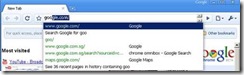
    Unlike Firefox, you can’t find a search bar in Chrome. To perform a search, simply type your search phrase in the URL bar and press ‘Enter’. Chrome will automatically perform a Google search with the phrase.

    clip_image001

    If you want to go to a site rather than performing a search, press “Ctrl + Enter” instead. This will insert www and .com in front and behind of the term and Chrome will bring you to the site.

    3) Change omnibox suggestion count

    By default, Chrome only shows 5 URL suggestions when you type in the URL bar.
    clip_image003

    o increase/decrease the suggestion count, simply add the command line switch

    –omnibox-popup-count=your_desirable_suggestions_count

    where your_desirable_suggestion_count is the number of suggestions that you want it to show.

    In Windows, right click on the Chrome shortcut icon and select Properties. In the Target field, add the above command line switch to the end of the command.

    In Ubuntu, on the desktop, right click on the Application menu and select Edit Menus. Navigate to wine->Programs->Google Chrome on the left pane. Double click on Google Chrome on the right pane and edit the Command

    4) Creating multiple profiles

    If you are sharing your computer with others (such as your family members), you may want to create a separate profile for everyone others won’t have access to your search history.

    Open the User Data folder your Chrome installation directory.

    For Windows Vista

    C:\Users\\AppData\Local\Google\Chrome\User Data

    For Windows XP

    C:\Documents and Settings\\Local Settings\Application Data\Google\Chrome\User Data

    For Ubuntu

    /home/USERNAME/.wine/drive_c/windows/profiles/USERNAME/Local Settings/Application Data/Google/Chrome/User Data

    Copy the Default folder and paste it in the User Data folder under another name (say Your_name).

    Create a shortcut icon on your desktop and add the following command switch to your path:

    –user-data-dir=”..\User Data\Your_Name”

    For Vista:

    C:\Users\USERNAME\AppData\Local\Google\Chrome\Application\chrome.exe -–user-data-dir=”..\User Data\Your_Name”

    For Windows XP

    C:\Documents and Settings\USERNAME\Local Settings\Application Data\Google\Chrome\Application\chrome.exe –-user-data-dir=”..\User Data\Your_Name”

    For Ubuntu

    wine /home/USERNAME/.wine/drive_c/windows/profiles/USERNAME/Local\ Settings/Application\ Data/Google/Chrome/chrome.exe –new-http –in-process-plugins –-user-data-dir=”../User\ Data\Your_Name”

    5) Change Chrome theme

    If you don’t like the default theme, you can easily change it with the following steps:

    • Download a Chrome theme of your liking.
    • Extract the default.dll file.
    • Navigate to your Chrome installation directory and go to /Application/Chrome version/Themes folder. The Chrome version will be in the form of 0.2.129.27. Replace the default.dll file in the folder with the default.dll file that you have just extracted.
    • Voila! Your Chrome is now dressed with the new theme.

    6) Email link with Gmail

    In Chrome, you can easily create a bookmarklet to email links with your Gmail account. Here is what you do:

    In your Chrome, press “Ctrl + B” to load the bookmark bar. Right-click on the bar and select ‘Add Page‘

    In the Name field, type Send with Gmail (or whatever name you like).

    In the URL field, copy and paste the following code:

    javascript:document.location=’https://mail.google.com/mail/?ui=1&view=cm&fs=1&su=’+document.title+’&body=’+document.location;

    and press OK.

    If you want Gmail to load in a separate tab, insert this code instead:

    javascript:window.open(’https://mail.google.com/mail/?ui=1&view=cm&fs=1&tf=1&su=’+document.title+’&body=’+document.location);return false;

    Whenever you want to send a link to other, simply click the Send with Gmail bookmarklet and the Gmail compose mail window will appear.

    7) Download Youtube video

    This trick allows you to download Youtube video right from your Chrome.

    Same as the Send with Gmail trick, make a new bookmarklet and name it Download Youtube

    In the URL field, copy and paste the following code in:

    javascript:window.location.href=’http://youtube.com/get_video?video_id=’ + swfArgs['video_id'] + “&l=” + swfArgs['l'] + “&sk=” + swfArgs['sk'] + ‘&fmt_map’ + swfArgs['fmt_map'] + ‘&t=’ + swfArgs['t'];

    Now go to Youtube and watch any video. Click the Download Youtube bookmarklet and it will save the current video to your hard drive. Remember to add a .flv extension to the downloaded video.

    8 ) Zoom in/out

    For those who find that the font is too big/small for your viewing, you can zoom in/out the page by pressing Ctrl + Mousewheel.

    9) Drag and drop tab to load in a new window

    When you have more than one tabs, you can easily drag any tab and drop it on the menu bar to load a new window.

    10) Install Greasemonkey on Chrome

    Although Greasemonkey is an addon for Firefox, you can easily get it to work in Chrome with this simple tweak:

    Drag this Monkey to your Chrome bookmark bar.

    This Monkey bokmarklet will enable any userscripts to be automatically turned into bookmarklets.

    To install Greasemonkey script on Google Chrome, go to user script and search for the Greasemonkey script you want. Visit the installation script page which says “install the script” and click on the Monkey bookmarklet, this will change the script into Chrome compatible bookmarklet. Now drag “Install the script” onto the bookmark bar of chrome.

Click here to download Google Chrome


Readmore,..

What is Torrent and How to Speed Up your Torrent

From what-is-torrent.com and pctipsbox.com

Torrent is a small file (around few kilobytes) with the suffix .torrent, which contains all the information needed to download a file the torrent was made for. That means it contains file names, their sizes, where to download from and so on. You can get torrents for almost anything on lots of web sites and torrent search engines.

Torrent is the most popular way of downloading large files, including movies and games (remember legality of downloading).


Downloading with a torrent is advantageous especially when downloading files, which are momentarily very popular and whitch lots of people are downloading. Because the more people download the file, the higher speed for everyone

Downloading with a torrent is actually very simple. You just need a rightly set torrent client (setting your connection speed is usually all you need to set). Then you open the torrent file inside your client, set a place where you want to download desired files and then just wait till it's downloaded. Downloading with a torrent is no more complicated than using any other p2p application, but even simpler.

Newest client versions:
uTorrent - 1.7.7(220 KB)
Azureus - 3.0.5.0(7,5 MB)

If you want to know more about torrents, continue to torrent principles or if you know enough, go pick a client to download.

Tips to Speed Up your Torrents:

1. Cap your upload (most important)

Limit your upload speed to approximately 80 percent of your maximum upload rate. You can check your upload speed over here (never trust your isp). Once you know your maximum upload speed, change the max upload (to 80%) speed in your torrent client’s preferences.

Don’t get me wrong, everyone should share as much as possible, but if your upload rate reached it’s max, your download rate suffers significantly.

2. Hack the max TCP connections

If you’re on XP sp2, your TCP connections are limited to a maximum of 10. This seriously hurts your downloading speed because it wont let you connect to a high amount of ip numbers. It is supposed to slow down viruses because their spreading strategy is to connect to a high amount of ip numbers, but it also cripples your torrent downloads.

A nice way to fix this is to download this patch, it allows you to set the maximum allowed connections to any number you want. Any number between 50 and 100 is ok .

3. Check seeds and peers

A simple tip, but o so important. Always look for torrents with the best seed/peer ratio. The more seeds (compared to peers) the better (in general). So 50 seeds and 50 peers is better than 500 seeds and 1000 peers. So, be selective.

4. Change the default port.

By default, BitTorrent uses a port 6881-6999. BitTorrent accounts for a lot of the total internet traffic (1/3), so isp’s like to limit the connection offered on the these ports. So, you should change these to another range. Good clients allow you to do this, just choose anything you like. If you’re behind a router, make sure you have the ports forwarded or UPnP enabled.

5. Disable Windows Firewall

It sucks. Windows Firewall hates P2P and often leads a life of it’s own. So disable it and get yourself a decent firewall, Kerio or Zone Alarm for example.


Readmore,..

STARTUP BLASTER : make your windows startup faster

Just as usual,i will give you free software,and some review about it. In this moment,I give you Startup Blaster for free.Startup Blaster is a software made by XenCare,like it called,its function is to faster your windows startup. So,this software is right for those who fed up with slow startup on your windows operating system.

Actually,there are some reason behind slow startup on your computer,one most considerable is your startup system that contain:

  • Startup Entries to run associated services for programs
  • Startup Entries to run the program on windows startup
  • Startup Entries to load some DLL sometime to run the corresponding program
  • and some other entries within your startup system

Those things automaticaly added in your startup system when you install various programs on your computer. Therefore, you can filter what startup entries that windows should load it or not when windows startup. Just click Windows,point to Run,and type msconfig,click on the startup section,there you can check and uncheck startup entries windows should load it or not.

image


But,if this trick doesn't work effectively on your computer,you should spend some time to try Startup Blaster. I tell you, it has a simple interface, so it doesn't difficult you when you are using it.

clip_image002


There, you can wheter delete or delay Startup programs, which give you a flexibility of doing your computer things. Click this link below to download Startup Blaster.

Download Startup Blaster

Readmore,..