Are you the one who submit your blog post continually to some of big social bookmarking website: Digg, StumbleUpon, del.icio.us ? If the answer is NO,either shoot yourself now, or go sign up yourself. Haha,i'm just joking... :))
But, have you ever wondered how painful it was if you have to submit all of your BEST post (i said BEST b'coz u don't have to submit all of your post,unless all of your post is GREAT) to at least 4 or 5 big social bookmarking? well, it's too time consuming and also a tedious task for you. But, if you read my tutorial completely, you don't have to worry about it.
This time i'm talking about socialmatic . Anyway, what is socialmatic? socialmatic is an instrument which will help you to automatically submit your post to all social bookmarking site you want in one click. All you have to do is easy, sign up yourself to SocialMatic , verify your account, and you have to set up your configuration.
I tell you, at the certain step, you will be prompted to drag a special link to your webbrowser toolbar. After you successfuly drag it, you need to store all of your login data of each social bookmarking website. Now, test it. Go to your page you wanna submit. And click SocialIt(std) button placed on your toolbar. And the final step is simply fill in the form provided and click Submit.
Hmm, now your tedious work become more lighter right? but i have some advice for you in using SocialMatic:
- Some other version of this tutorial tells you that you have to submit your homepage. But i tell you that it is fine if you submit some other pages from your blog. But, if you have already submit your blog homepage, don't forget to update your blog so often, so your readers won't be bored with your content.
- Cross check your traffic flow - Yes, you have to check your traffic flow (maybe you can use google analytics, it's a good instrument for you) after you use SocialMatic. Check whether it brings positive or negative result to your traffic flow. Hopefully it brings positive result for your traffic =)
Okay, that's it for this time. Hope you can learn something new from this tutorial.
Readmore,..

 "Better preventing than healing" . Have you ever heard that quote? Yes, it is usually said by doctor to keep your body healthy by preventing all the bacteria comes into your body. It is always better to prevent than to heal. And this quote also valid for the world of computer. It is always better to prevent virus comes into your drive than healing your drive after it crashed by viruses. Therefore i introduce you USB vaccine to keep your data traveler away from virus...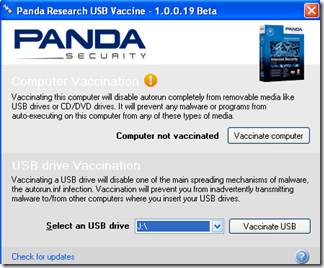
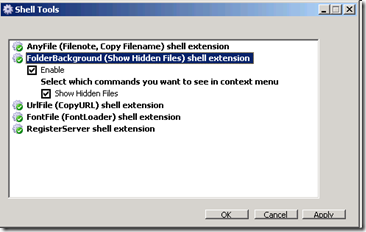
 Right Click button play important role in your computer. For example, if you want to copy paste files, you simply right click on the file you want to copy and select copy. Not only copy paste functionality does The Right click button on your mouse provide, but there are some other important access, such as launching Antivirus program or even display the properties of some files or folder as well. And recently, i found this interesting and pretty useful program that let you add right click functionality in Windows. This one called Shell Tools ....